I’m managing tasks in Coda using tables with grouped dates. By mistake I changed the grouped date for all records, and now every row has the same date. Unfortunately, there was no undo option for this change, and all my original dates are lost.
The only way I can think of is rolling back to a previous version via version history, but that would also overwrite other connected docs and linked changes, which I’d like to avoid.
Is there any way to:
Restore only that column’s previous values?
Or selectively roll back a table/column without affecting everything else?
It’s too late now, but command+z (for mac) or Ctrl+z (for windows) work in coda to undo your last action and can be repeated, but I am not sure how many steps you can undo and it will not go back to a previous session.
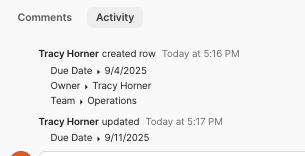
If it is a small group of rows that were changed, you can open the rows and go to activity (found at the bottom of the open row) to see what edits have been made to the row