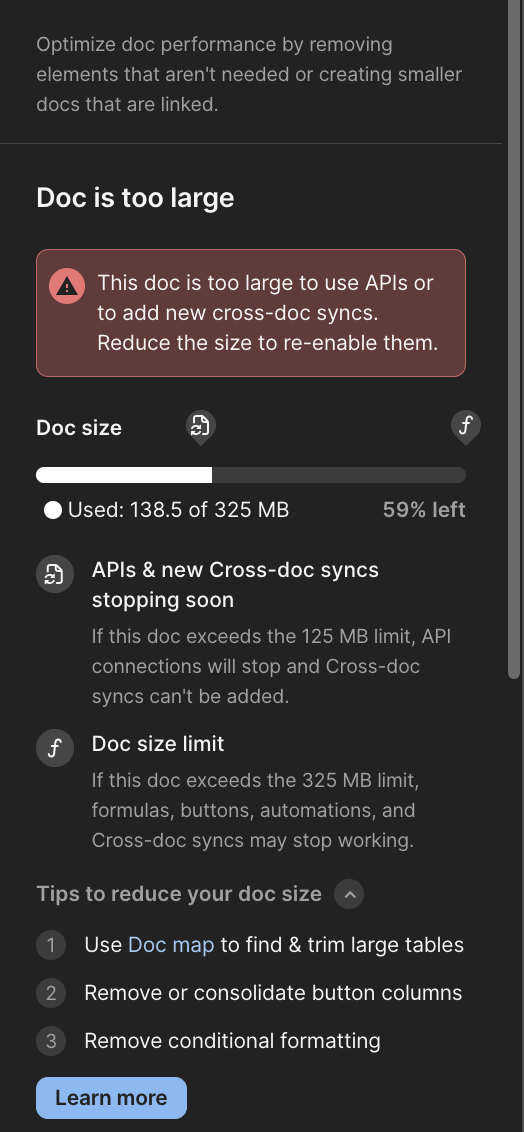
Posting here because I’m genuinely confused and increasingly frustrated by a recent change related to cross doc connections. Is anyone else running into issues?
To the other makers out there who are actively using CrossDoc, have any of you actually experienced Coda enforcing a cross doc connection limitation once a document exceeds 125 MB?
We haven’t run into a single issue over the past year, despite our document being over that size for quite some time. We’ve been creating new cross doc connections without problems until now. We’re well aware of the API limitation here, I’m just very confused about the cross doc enforcement.
I’m completely willing to admit that I may be missing something or misunderstanding how this is supposed to work, but at the moment the way this limitation is being framed by Coda support does not line up with how we’ve experienced it in practice.
The other issue is the obtrusive red dot and warning notification that is now being shown to everyone in our document, including users who have no ability to act on it. This has caused a lot of internal noise and confusion at my company, and there’s currently no way to suppress or limit this notification to creators only.
More than anything, I’m confused by the timing. At the same time that Shishir and other Coda engineers are talking publicly about building a new data layer and expanding what’s possible with data in Coda, we’re seeing disruptive data notifications surfaced without warning which indicate the opposite. It’s also strange that there’s been no proactive communication from the product or engineering team about this.
@Chris_Williams1 I couldn’t agree more with this! I spent half my day getting frantic messages from my colleagues about this, which caused myself to panic and try to sort through what was going on when in reality things have not changed on my end. Our docs are large but nothing Coda isn’t suppose to handle and we have active processes in place to maintain data at a usable size. Not to mention we have had these docs at or around the size the entire duration of this past year with 0 issues. I was extremely caught of guard by this change and really hope this does not indicate a shift away from the previously posted public mission of expanding the possibilities of data in Coda.
My main document also received this notification again, but in a new format. I duplicated the document and started experimenting by deleting a large number of rows, but I still couldn’t significantly reduce the document size or get rid of this notification. I really want to believe this is a bug
On the left is the original document; on the right is a duplicate of the same document, but as an experiment 13,558 rows were removed, along with views, controls, formulas, and buttons. This resulted in the document being reduced by only 3 MB, which makes me think that something isn’t right.
A doc we’ve used for years is suddenly flagged as too large—with no prior warning, despite Coda’s documentation stating we’d receive emails in advance. What’s more puzzling is that this isn’t even close to our largest doc in terms of table or row count, yet the other docs seem fine (for now).
The “APIs & new Cross-doc syncs stopping soon” message is both menacing and vague. According to Coda, the doc has already exceeded 125 MB, but the API is still working—so are we just supposed to live in fear of it stopping any day now? We have critical business processes that depend on syncing data from this doc via the API.
production workflows that worked are suddenly broken!
no use reporting it here, you must raise a P1 ticket with coda support.
have you done that?
what was their response?
btw, i have replaced almost all cross doc table sharing in my client’s workflows with row based webhooks. its way more complicated to build and test, but it bypasses the many issues with cross doc tables. we look forward to the day when this is no longer necessary.
I have contacted support about the same issue.
The limits have not changed, but the notifications have changed indeed.
At 125MB the API’s are supposed to stop working (my doc is a little over that size and they still work, but they will stop at some point).
Stored files do not count towards the doc size.
This was the answer from support:
Thanks so much for reaching out, and I’m sorry for any confusion this may have caused. I want to reassure you that our doc functionality and size limits haven’t changed. What has changed is that we recently introduced clearer, more explicit in-product warnings to better communicate existing in-doc limits, including the API doc size limit, which is stricter than the overall Doc size limit. These updates are designed to make limits easier to understand upfront and help prevent unexpected interruptions. You can find more details on our doc size limits here: Overview: Doc Limits.
Thanks for raising this, Chris. And thanks to everyone who’s shared similar experiences. We’re sorry for the confusion and frustration these new doc size and Cross-doc warnings have caused, and I want to clarify what’s going on.
To be clear up front: nothing has functionally changed in terms of enforcement. These limits have been in place for some time, and we haven’t made them stricter or introduced any new enforcement.
What has changed is visibility. We introduced earlier warnings based on feedback from makers who encountered limits unexpectedly, often without notice, and only realized they were close to the limit after something stopped working. Our goal was to help you remediate proactively rather than be surprised.
That said, we hear the concerns about how this was rolled out, and we agree there are areas for improvement. In response to feedback, we have rolled back the changes. After the holiday, we are going to take the following steps to address feedback:
Limit notifications so warnings are shown to the people who can take action.
Update the messaging to explain better what the warning means and what (if anything) needs attention.
Communicate the release and update our documentation.
I also want to emphasize that performance and scalability are a core focus for our team. We’re actively investing in expanding what’s possible with data in Coda, including the data scalability work many of you have heard us talk about. These visibility improvements are part of that broader commitment: helping you build powerful systems and workflows, while maintaining reliable, performant docs.
Thank you again for the candid feedback; it’s directly shaping how we refine this experience.
Thanks for the clear communication and for responding directly in the community.
To be clear: I actually welcome earlier warnings. The previous approach—only finding out about size limits after something breaks—was far worse.
That said, I want to flag a documentation issue that’s been a real pain point. When we evaluated Teams, we specifically looked at this page:
Pro, Team, & Enterprise plans: no doc size limits
This isn’t accurate. There’s always been a threshold beyond which formulas stop working—and a doc without formulas isn’t a functioning doc. So there is a size limit. The warnings you briefly introduced finally revealed what it is: 325 MB.
What I’d prefer: transparency. Tell us the actual limit is 325 MB. Give us a way to check our doc and table sizes from day one—not just when we’re approaching the threshold. That lets us manage the risk proactively.
Really appreciate you engaging with the community directly on this. More of this, please!
One of the primary reasons I chose Coda was the promise of ‘unlimited’ service. I have built my entire business workflow around that premise, and to now be hit with a restrictive 325 MB limit is completely unacceptable.
When a service is marketed without limits, users expect to grow without hitting a ceiling. Imposing these constraints after a business has become dependent on the platform isn’t just a technical hurdle—it’s a dealbreaker. I am now actively looking for an alternative that respects its original terms and can actually support my data needs. ‘No limit’ should mean exactly that.
Great to hear you’ve rolled this back Jason and are monitoring this convo!
Can I suggest a better implementation? In practical reality, none of my cross-docs or pack tables are failing. Perhaps between the 125 and 325 limit the bar should show an “amber” warning, with the doc size progress bar filled in yellow to show that things might break. That seems like reasonable warning.
The first time the doc goes into that zone or has gone back into it after a while, perhaps it should pop-up a dismissible warning to Doc makers only. That seems like more proportionate to what you need to communicate to users.
Appreciate the ongoing discussion here. Key themes I’m hearing: clearer documentation about what these limits mean, better visibility into doc health before hitting thresholds, and more proportionate warnings.
I also want to clarify the “no doc size limits” messaging. There are no storage limits on our paid plans, but there are technical thresholds where certain features (API, Cross-doc, formulas) can become unreliable at very large doc sizes. We can be clearer about distinguishing storage limits from feature performance thresholds, and we’re actively working on updating our documentation to reflect that.
We’re taking all of this into account for the relaunch in the new year.
We’re running into serious confusion around the 125 MB API / Cross-doc limit. all my doc stoped working
We’ve had multiple docs well above 125 MB using Cross-doc, Packs, and APIs over a year in some cases with no issues. Suddenly we’re seeing warnings and blocked behavior, which Coda says is “just clearer communication.”
From our side, this feels like a new restriction in practice, not just messaging. If existing docs over 125 MB are no longer viable for Cross-doc / APIs, that’s a major breaking change—especially since these are some of Coda’s most powerful features.
Key questions:
What happens to existing large docs >125mb that depend on Cross-doc / APIs?
Are these workflows going to stop working?
Is it realistically expected that API-based systems stay under 125 MB?
This is particularly frustrating because Coda paid plans are not supposed to have these kinds of hard limitations, yet we are only made aware of them when our systems break, leaving no realistic time to adapt.
Hi Jason, thanks for responding and for the clarification.
I’m particularly concerned because I’ve been actively managing our doc sizes and was fully aware of the calculation and size limits 325mb. Over the past few months, we’ve been testing a new architecture, including splitting a large doc into three smaller ones, in preparation for rolling this out in the new year. During all of this testing, Cross-doc, APIs, and Packs worked reliably, even with docs well over 125 MB.
Since these recent changes, those same workflows are now failing. From our perspective, this does not feel like “visibility only.” It feels like a newly enforced, blocking restriction, not just clearer communication.
What I really need clarity on is this:
What will happen to existing docs over 125 MB that depend on Cross-doc and APIs?
Are these docs expected to eventually stop working?
If all of our docs are already above this threshold, what is the realistic migration path?
Cross-docs are one of the most used and useful feature.
All of our production docs are above 125 MB and have been working fine until now. If this threshold is effectively a hard limit going forward, it has a major impact on our ability to operate
Appreciate the engagement here, clear guidance on the future behavior of Cross-doc and APIs for larger docs would really help.